
Sectigo ACME Certificate-as-a-Service: order, domains and EAB keys
PrintIn short: with Sectigo ACME Certificate-as-a-Service, your own server requests and renews Sectigo certificates automatically over the ACME protocol. You order it in the TopHost client area, list the domains it should cover, copy the ACME credentials (EAB key ID, EAB HMAC key and server URL) and give them to an ACME client such as Certbot, acme.sh or win-acme. From then on, the client renews the certificates without your intervention.
When this service makes sense
- You run a VPS or dedicated server and want Sectigo certificates that renew themselves, without reissuing and reinstalling files by hand.
- You need wildcard or many names under one subscription.
- You want to avoid the work that comes with shorter certificate lifetimes: a classic certificate ordered as in ordering a paid SSL certificate must be reissued and reinstalled manually.
For a site on TopHost shared hosting that only needs HTTPS, the free certificate from AutoSSL is normally enough.
Step 1. Order the subscription
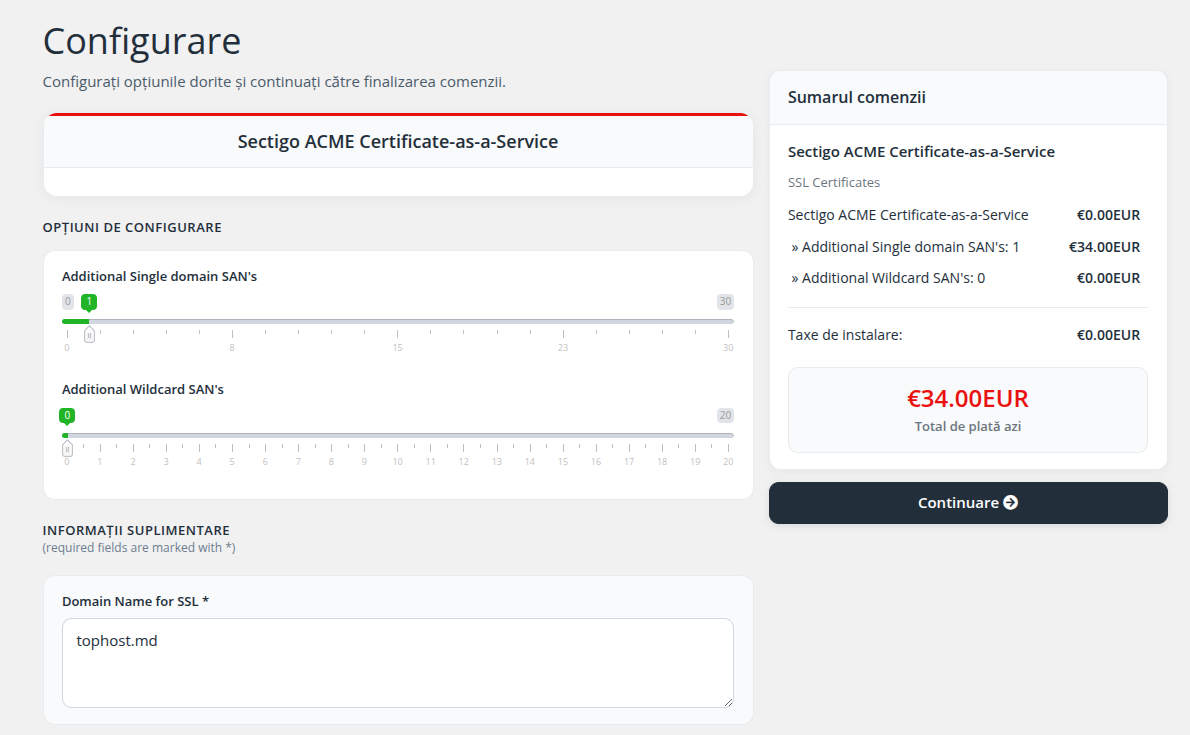
Choose Sectigo ACME Certificate-as-a-Service. The order page has these options:
- Domain Name for SSL (required): the main domain, for example
example.com. Its www version is added at no extra charge. - Additional Single Domain SANs: how many extra individual names you need, for example
shop.example.comorexample.net. - Additional Wildcard SANs: how many wildcard names you need. One wildcard such as
*.example.comcovers every first-level subdomain (www,mail,shopand so on), but not deeper ones likea.b.example.com.
Count the names before ordering: the subscription covers only as many names as you pay for. Check the summary on the right, click Continue and pay the invoice.
Step 2. Open the service
After the payment is recorded, go to My Services and open Sectigo ACME Certificate-as-a-Service. Its configuration status is Awaiting Configuration. Click Configure Now.
Step 3. Enter the domains
On the Subscription configuration page, type the names the certificates will cover, one per line, for example:
example.com
www.example.com
shop.example.com
For a wildcard, enter it in the form *.example.com. Click Submit Configuration.
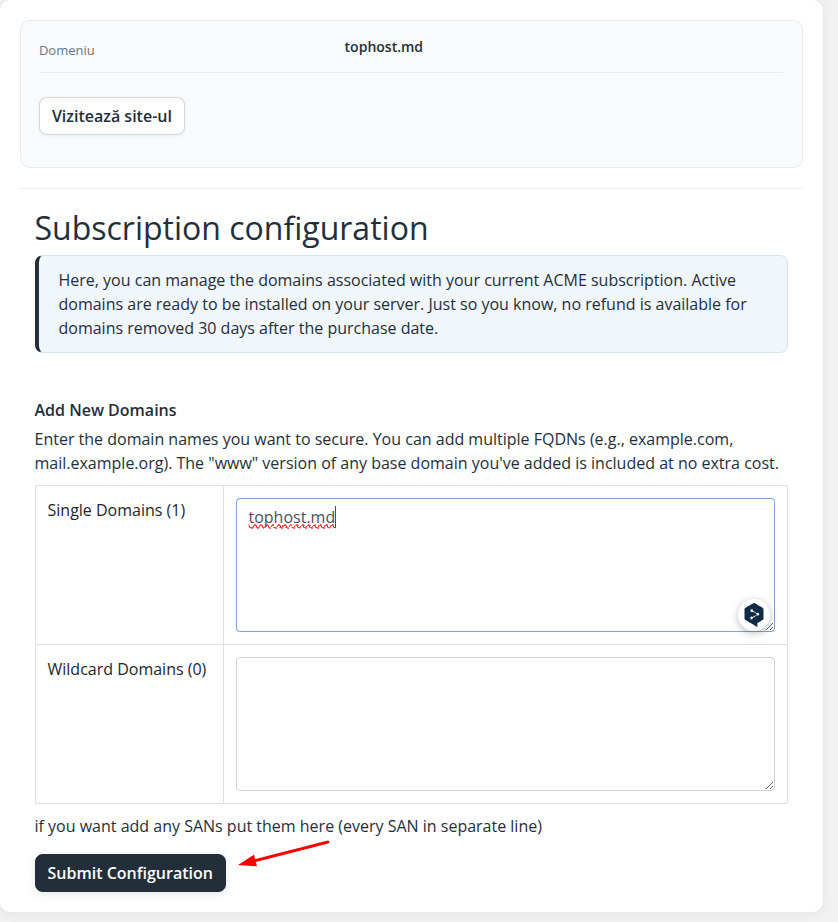
Your ACME client will later be able to request certificates only for these names. A request for a name that is not on the list is refused.
Step 4. Copy the ACME credentials
Once the configuration is accepted, the service becomes active and the SSL Orders Summary section shows:
- ACME Account ID: the identifier of your ACME account at Sectigo, useful when you contact support;
- EAB MAC ID: the External Account Binding key identifier;
- EAB MAC Key: the secret HMAC key that goes with it;
- Server URL: the ACME directory address, for DV certificates
https://acme.sectigo.com/v2/DV.
Each ACME client names these fields a little differently:
| Client area field | Certbot and acme.sh | win-acme |
|---|---|---|
| Server URL | --server | --baseuri |
| EAB MAC ID | --eab-kid | --eab-key-identifier |
| EAB MAC Key | --eab-hmac-key | --eab-key |
Treat the EAB MAC Key like a password: anyone who has it can obtain certificates for your domains from your subscription. Do not paste it into public forums, shared documents or screenshots, and do not send it in tickets unless we ask for it.
Step 5. Connect your server
A quick example with Certbot, using the webroot method on a server where the site is served from /var/www/example.com:
sudo certbot certonly --webroot -w /var/www/example.com \
  --server https://acme.sectigo.com/v2/DV \
  --eab-kid YOUR_EAB_MAC_ID --eab-hmac-key YOUR_EAB_MAC_KEY \
  --email admin@example.com --agree-tos --non-interactive \
  -d example.com -d www.example.com
The client stores the account, so renewals later run without the EAB data. Choose the detailed guide for your platform:
- Certbot on Apache and Nginx (Ubuntu, Debian, AlmaLinux, Rocky Linux)
- acme.sh on TopHost cPanel hosting
- LiteSpeed and OpenLiteSpeed with acme.sh
- Node.js applications
- Windows Server IIS with win-acme
Questions clients ask
Will I need to renew the certificates myself?
No. The ACME client checks the certificates regularly (through cron, a systemd timer or a scheduled task on Windows) and renews them before they expire. Your part is to keep the subscription paid and the client running.
What happens if the subscription is not renewed?
Your server can no longer obtain new certificates. Certificates already issued keep working until their own expiry date, after which browsers will show a warning.
Can I add a domain later?
Yes, within the number of names in your subscription. If you need more names, contact us through a ticket to change the subscription.
The client says "unauthorized" or the account cannot be registered.
Check that the server URL, EAB MAC ID and EAB MAC Key were copied completely, without spaces or line breaks, and that the requested names are on the Subscription configuration list.
If you use another platform or the client returns an error you cannot solve, open a ticket with the command you ran (without the EAB MAC Key) and the full error text.
