
How to forward email in cPanel to another address
PrintA forwarder sends every message that arrives at one address on to another address, for example from sales@your-domain.md to the manager's mailbox. You create it in cPanel under Email, then Forwarders, in about a minute.
Does a copy stay in the original mailbox?
Only if a real mailbox with that address exists. Two common set-ups:
- Mailbox plus forwarder:
sales@exists as an email account and also has a forwarder. The message is stored insales@and a copy goes to the destination. Remember that this mailbox keeps filling up and needs cleaning from time to time. - Forwarder only: there is no email account
sales@, only the forwarder. Nothing is stored on the server; the message goes straight to the destination. This is the right choice for an alias you never read directly.
Create a forwarder
- Log in to cPanel, open Email and click Forwarders.

- Click Add Forwarder.
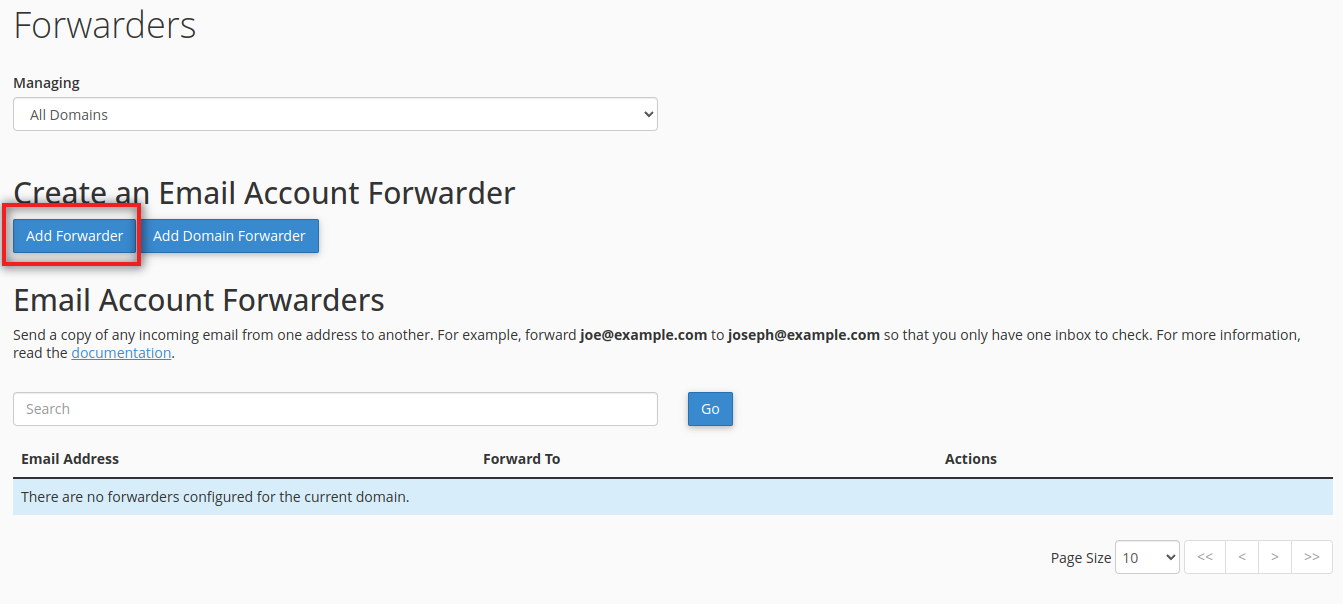
- In Address to Forward, type the part before the @ and choose the domain from the list.
- Under Destination, leave Forward to Email Address selected and type the full address that should receive the messages. It can be on your domain or anywhere else.
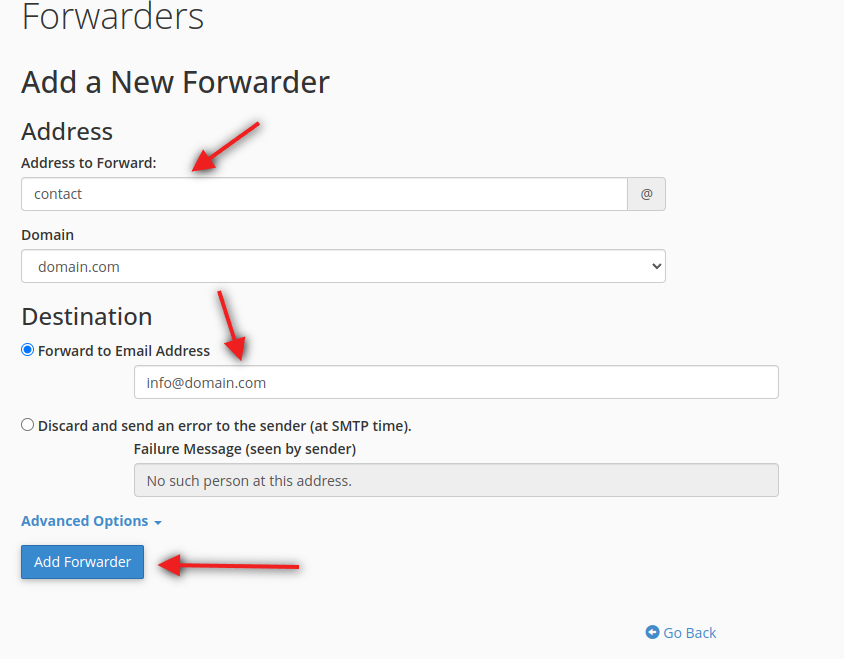
- Click Add Forwarder. The rule works immediately.
- Test it: send a message to the forwarded address from an outside mailbox and check that it arrives at the destination.
To send the same messages to several people, add one forwarder per destination for the same address.
Other destination options
- Discard and send an error to the sender (at SMTP time): useful for an address you have closed, for example after an employee leaves. The sender gets an immediate error with the text you write, instead of mail disappearing silently.
- Pipe to a Program (under advanced options): passes the message to a script on the hosting. This is meant for developers.
Forward all mail of a domain
On the same page, Add Domain Forwarder passes the mail of a whole domain to another domain: a message for anyone@old-domain.md goes to anyone@new-domain.md. This is handy when you move to a new domain name. Addresses that do have their own mailbox keep receiving their mail as before.
Change or delete a forwarder
Forwarders cannot be edited. In the list on the Forwarders page, click Delete next to the old rule and create a new one.
Before you forward to Gmail or another free service
- Spam that arrives at your address is forwarded too. The receiving service sees it as coming from our server, which can hurt delivery. Turn on the spam filters in cPanel so that obvious spam is marked first.
- Forwarded messages follow the same mail limits: up to 50 MB per message, and attachments of blocked types cannot be forwarded.
- If messages forwarded to an outside service end up in Spam there, read why emails land in Spam.
Forward only some messages
A forwarder copies everything. To forward only messages from a certain sender or with a certain word in the subject, use Email Filters in cPanel and choose the action Redirect to Email.
Forwarding does not work?
Open Email, then Track Delivery in cPanel and search for the test message: it shows whether it was forwarded or refused and why. If you cannot find the cause, open a ticket with the source and destination addresses and the time of the test.
